How To Turn Off Autocorrect or Predictive Text On WhatsApp
Because we often type quickly, even while walking, the spell checker can suggest words or phrases we didn’t intend to type. To avoid this, you will need to disable the spell checker on WhatsApp. Here’s how you can turn off autocorrect or predictive text on WhatsApp. Turn Off Autocorrect on WhatsApp iPhone 1. Open Settings. […] The post How To Turn Off Autocorrect or Predictive Text On WhatsApp appeared first on TechViral.



Because we often type quickly, even while walking, the spell checker can suggest words or phrases we didn’t intend to type. To avoid this, you will need to disable the spell checker on WhatsApp. Here’s how you can turn off autocorrect or predictive text on WhatsApp.
Turn Off Autocorrect on WhatsApp iPhone
1. Open Settings.
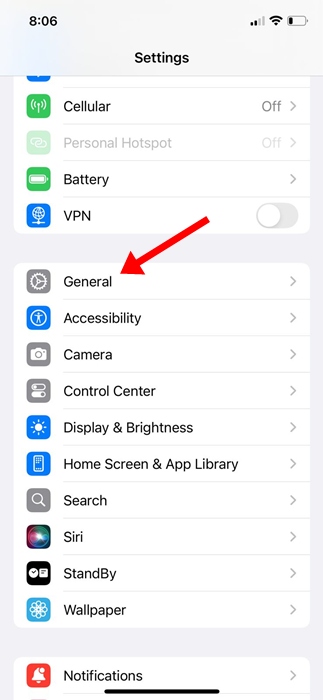
2. Scroll down a bit and tap on General.
3. Scroll down and tap Keyboard.

4. Disable the toggle beside Auto-correction and Predictive Text.

The above steps will deactivate the auto-corrector in WhatsApp. Now, we can go back to the messaging application and verify whether we have correctly deactivated it or not.
Turn Off Autocorrect on WhatsApp Android
On Android, the process to disable the spell checker in WhatsApp is still quite similar. Here’s what you should do.
1. Launch the Gboard app.

2. Select Text Correction.

3. Disable the Show Suggestion Strip, Next-word Suggestions, and Auto-Correction.

This will disable auto-correction and predictive text on your Android phone (if you use Gboard). For any other keyboard app, access the app settings and disable the auto-correct feature.
What do you think about this? Share all your views and thoughts in the comment section below. If you find this guide helpful, don’t forget to share it with others.
The post How To Turn Off Autocorrect or Predictive Text On WhatsApp appeared first on TechViral.
What's Your Reaction?